

Microsoft BizTalk Server has supported mission-critical EDI and integration environments for more than 25 years. But with BizTalk Server 2020 now confirmed as the final release, many organizations are asking what comes next.
Microsoft identifies Azure Logic Apps, part of Azure Integration Services, as the successor to BizTalk Server. New BizTalk Server sales are expected to end March 31, 2027. Mainstream support for BizTalk Server 2020 continues through April 11, 2028; paid extended support for non-security fixes continues through April 9, 2030; and end of support is April 10, 2030. Organizations do not need to move every workload immediately, but they should use this runway to assess their environment and build a phased modernization plan.
Below, we answer some of the most common questions about BizTalk Server, Azure Logic Apps, and making the transition between them.
For a deeper look at how the two platforms relate, read The Platforms We Support: Microsoft BizTalk Server and Azure Logic Apps .
Jump to:
- Platform Strategy
- Migration and Modernization
- Architecture and Deployment
- Integration Capabilities
- Performance and Scalability
- Pricing and Licensing
- Operations and Support
- Security and Compliance
- AI and Copilot Features
Platform Strategy
What is the future of BizTalk Server, and is Microsoft still investing in it?
BizTalk Server 2020 is the final version of BizTalk Server, and new sales are expected to end March 31, 2027. Mainstream support continues through April 11, 2028. Paid extended support for non-security hotfixes continues through April 9, 2030, with end of support on April 10, 2030. Microsoft now directs new integration investment toward Azure Logic Apps and the broader Azure Integration Services platform. Organizations running BizTalk have a defined runway, but they should begin planning now rather than waiting for the final support deadline.
Should we stay on BizTalk or migrate to Azure Logic Apps?
It depends on your environment. A stable BizTalk implementation may still make sense to operate while it remains supported, especially when replacing it offers little immediate business value. Logic Apps becomes more compelling when you want cloud-native integration, greater scalability, less infrastructure management, or broader use of Azure services.
Remedi recommends assessing the current environment and developing a migration roadmap rather than moving simply for the sake of moving.
What's the difference between BizTalk Server, Logic Apps Consumption, and Logic Apps Standard?
BizTalk is server-based enterprise middleware that you install and manage. Logic Apps Consumption is Microsoft's multitenant, usage-based option and is well suited to variable workloads. Logic Apps Standard uses a single-tenant architecture with provisioned compute, supports multiple stateful and stateless workflows, and offers more networking, performance, and deployment control. Standard is Microsoft's recommended Logic Apps model for BizTalk migrations; Standard Hybrid extends that runtime to customer-controlled infrastructure for eligible hybrid scenarios.
Can BizTalk and Logic Apps coexist in a hybrid integration environment?
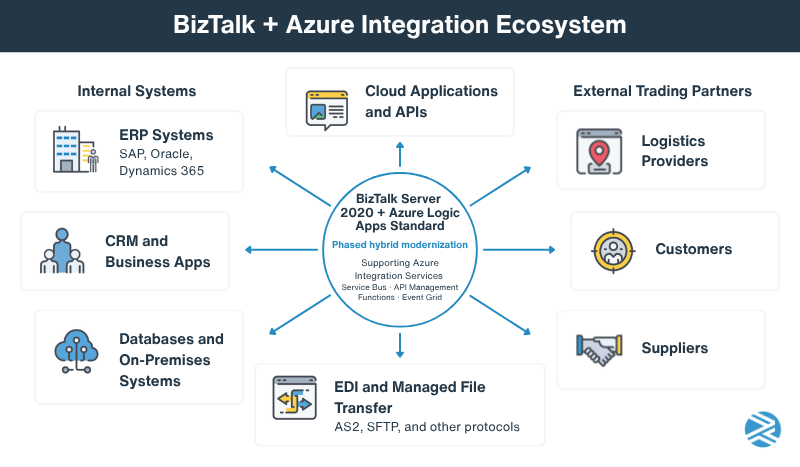
Yes. BizTalk and Logic Apps can operate together, making phased modernization possible. You can keep integrations that are working well on BizTalk while moving selected workloads or building new integrations in Azure. Remedi recommends this type of incremental approach when it reduces migration risk and gives teams time to gain experience with Logic Apps.
What types of organizations are still a good fit for BizTalk?
BizTalk can remain a good near-term fit for organizations with stable, mature on-premises integrations, significant legacy-system dependencies, and experienced BizTalk teams. Remedi has seen organizations gain substantial value simply by optimizing an existing BizTalk environment.
Considering another platform? Read Are All B2B Integration Platforms Alike? Yes and No.
Migration and Modernization
How difficult is it to migrate from BizTalk to Azure Logic Apps?
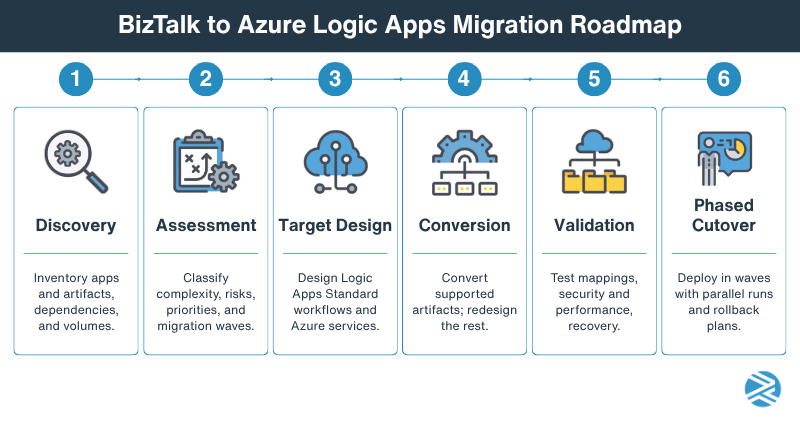
The difficulty depends on the size and complexity of your BizTalk environment. Straightforward interfaces may migrate relatively easily, while custom pipelines, complex orchestrations, B2B processes, legacy adapters, and custom code require more planning. Start with discovery and assessment so you know what you have before deciding how to move it.
Is there an automated migration tool from BizTalk to Logic Apps?
Yes. The Azure Logic Apps Migration Agent for Visual Studio Code can discover, analyze, plan, convert, validate, and deploy supported BizTalk Server 2016 and 2020 projects to Logic Apps Standard. It is currently a preview capability and should be viewed as a migration accelerator, not a push-button substitute for architecture, testing, and human review.
Can we migrate incrementally, or does it require a complete cutover?
You can migrate incrementally, and that is often the lower-risk approach. Workloads can be grouped into migration waves while BizTalk and Logic Apps coexist. This gives your team time to test, learn, and improve the migration process before moving more complex or business-critical integrations.
What happens to our existing orchestrations, maps, and pipelines during migration?
Some artifacts can be converted or adapted for reuse, while others may need to be redesigned. The Azure Logic Apps Migration Agent can analyze BizTalk orchestrations, schemas, maps, pipelines, and bindings and convert supported functionality into Logic Apps Standard artifacts. The goal should not necessarily be to recreate BizTalk exactly, but to preserve the required business process using an architecture designed for Logic Apps.
How do we handle business-critical integrations that can't tolerate downtime?
Use a phased cutover with thorough testing, transaction reconciliation, and a rollback plan. Where practical, Remedi recommends running BizTalk and Logic Apps in parallel long enough to validate results before moving production traffic. The migration plan should also account for queued transactions, partner coordination, endpoint changes, and monitoring before cutover.
Want a system health check before committing to a migration roadmap? Download our free B2B Integration Performance Assessment Template.
Architecture and Deployment
Can Logic Apps connect to on-premises systems without moving everything to Azure?
Yes. Logic Apps supports hybrid integration, so applications and data can remain on-premises while workflows run in Azure. Depending on the connector and architecture, connectivity can use an on-premises data gateway or private network connectivity. Logic Apps Standard Hybrid is a distinct deployment option for organizations that need the Standard runtime on infrastructure they control; it should not be confused with Azure-hosted Logic Apps Standard.
How does Logic Apps handle hybrid integration scenarios?
Logic Apps can connect cloud applications and Azure services with on-premises applications, databases, file systems, and enterprise platforms. Logic Apps Standard adds virtual network integration and built-in connectors that can communicate directly with supported systems, making it especially useful when integration spans cloud and private networks.
What's the difference between Integration Service Environment (ISE) and Logic Apps Standard?
ISE was Microsoft's earlier dedicated Logic Apps environment for isolation and virtual-network connectivity. ISE was retired on August 31, 2024. Logic Apps Standard is the current single-tenant option and provides dedicated compute, virtual network integration, private endpoints, multiple workflows per resource, and greater control over runtime settings.
Can Logic Apps be deployed through CI/CD pipelines and Infrastructure as Code?
Yes. Logic Apps Standard supports local development, source control, automated deployment, and Infrastructure as Code. This allows organizations to manage workflows and supporting Azure resources through repeatable development, test, and production deployment processes rather than relying on manual portal changes.
How do Logic Apps fit into a broader Azure integration architecture with Service Bus, API Management, and Functions?
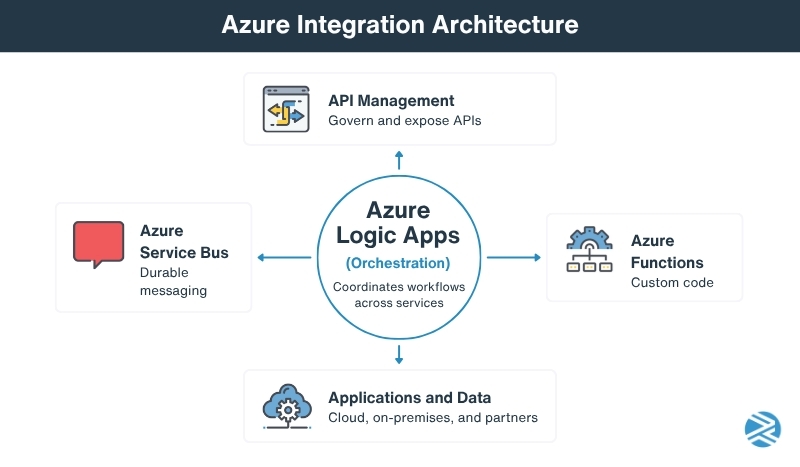
Think of Logic Apps as the workflow and orchestration layer. Azure Service Bus provides durable messaging, API Management governs and exposes APIs, and Azure Functions handles custom code. Used together, these services form an Azure integration architecture where each component does the job it is best suited to do.
Integration Capabilities
Does Logic Apps support EDI transactions such as X12 and EDIFACT?
Yes. Azure Logic Apps supports X12 and EDIFACT, as well as AS2 and other B2B integration capabilities. Integration accounts can store trading partners, agreements, schemas, maps, and certificates. Standard also offers built-in X12 capabilities designed for higher throughput and lower latency.
How do Logic Apps compare to BizTalk for B2B and trading partner management?
Both platforms support enterprise B2B integration, but the operating models differ. BizTalk provides mature B2B functionality within a traditional middleware platform. Logic Apps combines workflows with integration accounts, connectors, monitoring, and other Azure services. Teams moving from BizTalk should plan for that architectural and operational change, not just feature-by-feature conversion.
What connectors are available for SAP, Oracle, Salesforce, and Dynamics 365?
Logic Apps provides connectors for SAP, Oracle, Salesforce, Dynamics 365, and many other enterprise applications. Microsoft describes 1,400+ out-of-box connector capabilities across its integration ecosystem. Each connector exposes one or more operations, such as triggers and actions, and capabilities vary by workflow type. Verify the exact operations, authentication, networking, performance requirements, and application versions needed before choosing an integration design.
Can Logic Apps handle both event-driven and batch-based integrations?
Yes. Logic Apps workflows can respond to events and messages in near real time or run on schedules for batch-oriented processes. The right design depends on transaction volume, message size, processing window, connector limits, and the capacity of downstream systems.
How does Logic Apps support API integrations compared to traditional middleware?
Logic Apps can call and expose APIs as part of a workflow and works closely with Azure API Management for API security, governance, policies, and lifecycle management. This makes APIs another integration pattern alongside EDI, messaging, files, SaaS applications, and databases rather than a separate integration environment.
Performance and Scalability
Can Logic Apps handle the same transaction volumes as BizTalk?
Logic Apps can support high-volume enterprise integration, but there is no meaningful one-to-one transaction comparison with BizTalk. Throughput depends on workflow design, hosting model, connector limits, concurrency, payload size, and downstream systems. High-volume BizTalk workloads should be performance-tested with realistic production traffic before migration.
How does pricing change as transaction volumes increase?
With Consumption, charges are usage-based and generally rise with trigger and action executions and managed-connector activity. Standard uses provisioned compute capacity, which can provide more predictable costs for consistent or high-volume workloads. The better value depends on transaction patterns, connector mix, data retention, and the supporting Azure services the architecture requires.
What are the performance limitations of Consumption versus Standard plans?
Consumption operates in a shared multitenant environment and has platform-managed throughput limits. Standard uses dedicated resources and provides more control over performance settings, while built-in connectors can offer higher throughput and lower latency. Standard is generally better suited to workloads requiring predictable performance and greater runtime control.
How do organizations monitor throughput, latency, and failed integrations?
Logic Apps provides workflow run history and metrics, while Azure Monitor can track performance, failures, and alerts. Standard workflows can also use Application Insights for deeper telemetry. For B2B environments, monitoring should go beyond technical workflow status to include failed transactions, missing acknowledgments, unusual latency, and other business-level exceptions.
Pricing and Licensing
How is Azure Logic Apps priced?
Logic Apps Consumption uses usage-based pricing for trigger and action executions, with connector pricing varying by connector type. Logic Apps Standard charges for provisioned compute capacity. Additional charges can apply for managed connectors, integration accounts, storage, networking, monitoring, and other Azure resources. The right model depends on execution patterns, connector mix, and required capacity.
What Azure services typically add to the total cost of ownership?
Depending on the architecture, costs may include Service Bus, API Management, Storage, integration accounts, Application Insights, Log Analytics, Key Vault, networking, Functions, and other Azure services. Migration, support, training, and operational resources also belong in the TCO calculation.
Is Logic Apps actually less expensive than maintaining BizTalk Server?
It can be, but don't assume it will be. Logic Apps can reduce server, infrastructure, and platform-management requirements, while Azure consumption and supporting services create different costs. A useful comparison considers licensing, infrastructure, support, staffing, upgrades, Azure services, and BizTalk's approaching end of support, not simply the monthly platform bill.
How can we estimate migration and operating costs before moving to Azure?
Start with an inventory of your BizTalk environment, then classify integrations by complexity, transaction volume, dependencies, and migration effort. Build the target Azure architecture and estimate both Logic Apps and supporting services. The Azure Logic Apps Migration Agent can help inventory artifacts, identify dependencies and gaps, and estimate migration effort.
Operations and Support
How are Logic Apps monitored and supported after go-live?
Logic Apps can be monitored through run history, Azure Monitor, Log Analytics, alerts, and Application Insights. But tools are only part of the answer. A production support model should define who responds to failures, handles exceptions, maintains connections and certificates, manages deployments, and verifies that recovered transactions reach their destination.
What troubleshooting tools are available for failed workflows?
Run history lets support teams inspect individual triggers and actions, including their status, inputs, outputs, and errors. Azure Monitor and Application Insights provide deeper diagnostics and performance information. Good workflow design should also include correlation information so teams can trace a failed business transaction across multiple systems.
How do alerting and exception management work?
Azure Monitor can alert teams when workflow failures or other metrics cross defined thresholds. Logic Apps can also use retry policies and exception-handling patterns within workflows. The goal is to automate recovery where it is safe while quickly routing business exceptions that require human attention.
What skills does our team need to support Logic Apps in production?
Teams should understand workflow design, APIs, XML and JSON, connectors, authentication, Azure networking, monitoring, CI/CD, security, and error handling. EDI environments also require X12 or EDIFACT, mapping, trading-partner, and transaction troubleshooting skills. Moving from BizTalk changes the technology, but it doesn't eliminate the need for experienced integration people.
Security and Compliance
How does Logic Apps secure sensitive integration data?
Logic Apps can use Microsoft Entra identities, managed identities, role-based access controls, secure connections, private networking, and services such as Azure Key Vault. Logic Apps Standard also supports virtual network integration and private endpoints. As with any integration platform, those controls still need to be configured according to your organization's security requirements.
Can Logic Apps meet HIPAA, PCI DSS, and SOC 2 requirements?
Azure provides compliance programs and certifications that can support regulated workloads, including environments subject to HIPAA and PCI DSS requirements. But using an Azure service does not automatically make an integration compliant. Compliance depends on the complete architecture, configuration, access controls, data handling, logging, and operating procedures.
How does Microsoft handle encryption, audit logging, and access controls?
Azure provides encryption capabilities for data at rest and in transit, Microsoft Entra ID and role-based access control for identity and permissions, and Azure monitoring services for logging and auditing. Organizations can also use managed identities and Key Vault to reduce reliance on credentials stored directly in integration configurations.
What options exist for private networking and secure connectivity to on-premises systems?
Logic Apps Standard supports virtual network integration and private endpoints, while on-premises connectivity can use options such as gateways and private Azure networking. Some Standard built-in connectors can connect directly to systems through an integrated virtual network, reducing extra network hops.
AI and Copilot Features
How does Microsoft Copilot help build and maintain Logic Apps?
Microsoft offers an AI-powered workflow assistant for Logic Apps Standard that can explain workflows, recommend and compare connectors, answer configuration questions, and suggest design and error-handling practices. Microsoft is also using GitHub Copilot in its new Logic Apps Migration Agent to analyze and convert legacy integration workloads.
Can AI assist with workflow creation, mapping, and troubleshooting?
Yes, although capabilities vary. AI can help analyze existing integrations, suggest Logic Apps patterns, generate workflow components, explain unfamiliar workflows, and assist with troubleshooting. The Azure Logic Apps Migration Agent uses specialized Copilot agents for analysis, migration planning, and conversion, while GitHub Copilot for Azure can help investigate Azure errors and logs.
Are Copilot-generated integrations production-ready, or do they still require significant review and testing?
They still require review and testing. Microsoft specifically warns that its Logic Apps workflow assistant can produce responses that are valid but not semantically correct. AI-generated workflows should be treated like other generated code: review the architecture, security, mappings, error handling, and performance, then test both expected and exception scenarios before production.
Get More Value from BizTalk Today and Prepare for What Comes Next
You don't have to choose between ignoring BizTalk's end-of-support date and rushing into a migration.
The better approach is to understand your current environment, address issues that are costing you time or money today, and build a modernization roadmap around business priorities. For some organizations, that means optimizing BizTalk while planning a phased transition. For others, it means beginning Logic Apps migrations now.
Remedi supports both sides of that equation. Our team works with Microsoft BizTalk Server and Azure Logic Apps environments across consulting, staffing, health checks, modernization projects, and ongoing integration support.