

Boomi is often described as a low-code integration platform, but that only tells part of the story. Companies also use it to connect applications, manage APIs, support EDI and trading partners, improve data quality, and automate business processes. This guide answers some of the most common questions organizations ask when evaluating, implementing, or supporting Boomi. Use the index below to jump to the topics most relevant to your team.
Boomi Comparisons and Platform Fit
Boomi Architecture and Deployment
Boomi Connectors and Integrations
Boomi Implementation and Migration
Boomi Performance, Monitoring, and Security
Boomi Training, Support, and Managed Services
What Is Boomi?
What is Boomi, and how does the integration platform work?
Boomi is an integration platform as a service, or iPaaS. It gives teams one place to build and manage the data flows connecting cloud applications, on-premises systems, databases, APIs, and trading partners. The development tools run in the cloud, while the processes themselves can run in Boomi’s cloud or on infrastructure the company controls.
Is Boomi really low-code?
Yes. Boomi uses visual tools, pre-built connectors, and reusable components to reduce hand coding. That makes straightforward integrations faster to build. Complex work still calls for people who understand APIs, data structures, security, error handling, EDI, and the applications involved.
Teams also need consistent naming, documentation, review, and deployment practices. Without them, a low-code environment can become difficult to support surprisingly quickly.
What types of organizations and integration environments are a good fit for Boomi?
Boomi is generally a good fit for organizations connecting many applications or supporting a mix of cloud, on-premises, API, and B2B integration. The fit becomes less clear when a company has highly specialized EDI requirements, unusual security constraints, or an existing platform that already handles most workloads well. The useful comparison starts with the integrations the company must run, the skills available to support them, and the likely cost as the environment grows.
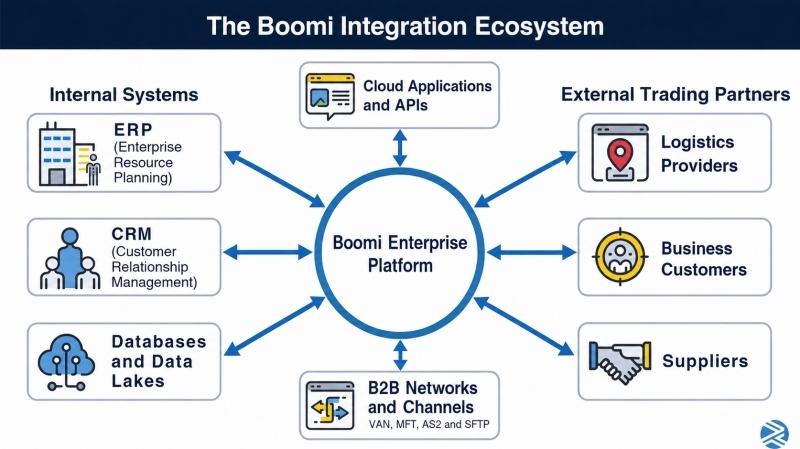 The Boomi Enterprise Platform connects cloud applications, APIs, enterprise systems, data environments, and external trading partners. This is a conceptual overview rather than a literal architecture diagram.
Boomi Comparisons and Platform Fit
Boomi vs. MuleSoft: what’s the difference?
Boomi is known for low-code integration, a broad connector library, and flexible runtime deployment. MuleSoft is often chosen for API-led architecture and enterprise API management.
Boomi may suit a team that wants to build integrations visually and support them with a smaller specialist group.
MuleSoft may suit a company with a mature API program and stronger developer resources. Licensing, governance, and the existing technology stack can change that choice.
Boomi vs. Cleo: which is better for EDI and B2B integration?
Cleo Integration Cloud is built heavily around EDI, trading-partner management, and supply-chain integration. Boomi covers B2B and EDI while extending further into application, data, API, and workflow integration.
Cleo may have the advantage when partner onboarding and transaction visibility drive the decision.
Boomi may be stronger when the same platform must handle a wider range of non-EDI integrations. The right answer depends on the actual partner network and operating model.
Can Boomi replace an existing EDI translator, middleware platform, API gateway, or managed file-transfer solution?
Boomi can take over many jobs performed by EDI translators, middleware, API gateways, and managed file-transfer tools. A complete replacement is less certain. An older platform may still handle a specialized protocol, a high-volume workload, or a partner requirement more economically.
Before consolidating, inventory what each tool does, how it is monitored, which security controls it provides, and what the Boomi license would cost at the expected volume.
Boomi Architecture and Deployment
What is a Boomi Atom?
A Boomi Atom, now also called a basic runtime, is the engine that executes integration processes. It can run in Boomi’s cloud or on infrastructure the organization controls. A Molecule, now called a runtime cluster, spreads processing across several nodes for added capacity and availability. An Atom Cloud, or runtime cloud, hosts workloads for multiple Boomi accounts in a shared environment.
How does Boomi connect cloud applications with on-premises systems?
A locally deployed Boomi runtime can communicate with ERP systems, databases, files, and applications inside the company’s network. Because the runtime initiates its connection to the Boomi platform, the company does not have to expose those internal systems directly to the public internet.
The same approach lets a process move data among on-premises systems, SaaS applications, and multiple cloud environments while keeping the runtime close to the systems that need it.
Boomi Connectors and Integrations
What Boomi connectors are available?
Boomi offers connectors for popular applications, databases, and protocols, plus general-purpose options for REST, SOAP, HTTP, files, messaging, and database connections. A connector may exist without supporting every object or operation an integration needs.
Test the exact application version, authentication method, required records, API limits, and error responses before treating the connector as a solved part of the project.
Does Boomi integrate with SAP, Salesforce, NetSuite, and Microsoft Dynamics?
Yes. Boomi provides integration options for SAP, Salesforce, NetSuite, and Microsoft Dynamics products. The connector alone does not settle the design. The team still needs to confirm the product version, available APIs, required business objects, authentication method, and expected volume.
A short proof of concept is worthwhile when the integration relies on an uncommon object or operation, because that is where connector gaps tend to surface.
What happens when Boomi doesn’t offer a pre-built connector for a system?
When Boomi lacks a pre-built connector, it can often reach the system through a REST or SOAP API, a database, a file interface, or a message queue. A custom connector is another option, although it adds code that someone must maintain.
The first question is which interfaces the target system reliably supports. Security, volume, and support ownership then determine whether a standard protocol or custom connector makes more sense.
Boomi Implementation and Migration
What should a Boomi implementation plan include?
A useful Boomi implementation plan begins with the business processes and transactions the integrations must protect. From there, it should map the systems involved, define the runtime architecture and security model, and set standards for mappings, naming, error handling, testing, and deployment.
The plan also needs named owners for monitoring and support, a rollback path, and a schedule for dependencies such as partner testing, certificates, network access, and vendor work.
How long does a Boomi implementation take?
A limited integration may take several weeks. A large migration or B2B program can take many months. A dependable schedule usually comes after discovery, when the team knows how many integrations, maps, partners, and exceptions are involved. Poor data, delayed system access, security reviews, and partner testing often add more time than building the basic process.
How do you migrate integrations to Boomi?
Start by inventorying every interface, map, endpoint, schedule, dependency, and service requirement in the current environment. Decide which workloads should be rebuilt first and which legacy assets, such as mapping rules or test files, are still useful. Each new Boomi process should be tested against the current business result.
Phased cutovers, parallel validation, reconciliation, and a working rollback plan reduce the risk of losing or duplicating orders, invoices, and other critical transactions.
Can a failed or incomplete Boomi implementation be repaired?
Yes. A recovery team first determines what is working, what is unfinished, and what is creating the failures. Reusable maps, connector configurations, and business rules may be worth keeping. Inconsistent process design, weak error handling, and undocumented deployments may need to be rebuilt.
Stalled projects often trace back to incomplete requirements, poor data, underestimated EDI work, or nobody owning key decisions. The goal is to preserve useful work without carrying the original problems forward.
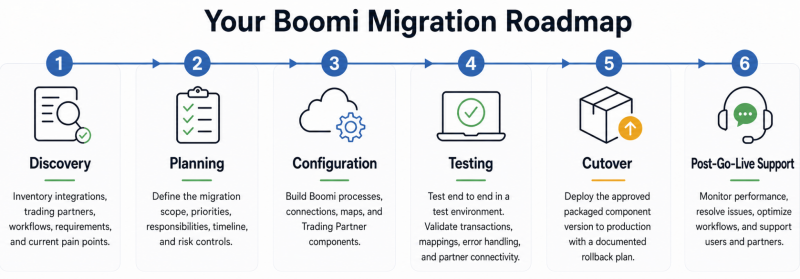
A controlled Boomi migration moves from discovery and planning through configuration, testing, production deployment, and post-launch support.
Boomi EDI and B2B Integration
Does Boomi support EDI?
Yes. Boomi can manage trading-partner profiles, maps, communications, acknowledgments, and monitoring for documents such as purchase orders, invoices, advance ship notices, and inventory messages. It can work well when those exchanges also need to connect with ERP, warehouse, CRM, or cloud applications.
In a large partner network, the deciding questions are how quickly partners can be onboarded, how exceptions are handled, and whether the support team has the visibility it needs.
Which EDI standards, document types, and communication protocols does Boomi support?
Boomi supports widely used EDI standards such as X12 and EDIFACT, along with communication methods including AS2 and SFTP. It can also support APIs, managed file transfer, ordinary file exchanges, and connections through value-added networks.
Confirm the exact standard version, transaction set, acknowledgment, encryption method, and industry guideline in the project requirements. Support for X12 in general does not guarantee support for every partner’s implementation.
How does trading-partner onboarding work in Boomi?
Onboarding starts with the partner’s identifiers, document requirements, communication method, and certificates. The team then configures maps, envelopes, routing, acknowledgments, and test cases before approving production exchange.
Standard intake forms and connectivity templates save time, especially when partners use the same basic pattern. Partner-specific rules should live in configuration where practical so every new relationship does not become a separate development project.
How does Boomi handle failed transactions, acknowledgments, retries, and exception alerts?
Boomi processes can capture errors, retry work, route failed documents, generate acknowledgments, and notify support staff. The design should distinguish between failures a system can safely retry and those a person must examine.
A temporary connection failure may merit an automatic retry. A purchase order with invalid data should usually be held for correction. Support staff also need to know when replaying a transaction could create a duplicate and how to confirm the final business result.
Boomi Performance, Monitoring, and Security
Can Boomi handle high transaction volumes?
Boomi can handle high transaction volumes when the runtime, process design, schedules, and infrastructure are sized for the workload. It supports real-time and batch processing.
There is no useful universal volume limit because document size, mapping design, connector calls, network latency, API limits, and the connected systems all affect throughput. Performance testing should use realistic files and production-like volumes, not a small set of clean development samples.
How should a Boomi environment be monitored in production?
Production monitoring should tell the support team whether runtimes are healthy, transactions are flowing, endpoints are responding, and exceptions are being resolved. It should also expose slowing processes, growing queues, repeated retries, missing acknowledgments, duplicate transactions, and expiring certificates. Alerts need business context. A failed test file and a stalled stream of customer orders should not arrive with the same urgency.
How does Boomi protect integration data, credentials, certificates, and connections?
Boomi provides controls for encrypted communication, stored credentials, certificates, user access, and runtime deployment. The customer is still responsible for configuring them correctly and protecting any locally hosted runtime.
Access should follow least-privilege principles, with production deployment and security administration limited to authorized staff. Secrets and certificates also need clear owners, renewal procedures, and monitoring so an expired credential does not stop a critical integration.
What should be included in a Boomi health check?
A Boomi health check examines how the environment is built, deployed, secured, monitored, and supported. It should uncover unstable processes, duplicated logic, weak error handling, access risks, missing documentation, licensing concerns, and integrations nobody is watching.
The first fixes should address business-critical failures, security exposure, expiring certificates, and transactions that can be lost or duplicated. Lower-risk cleanup can follow.
Boomi Pricing and Licensing
How much does Boomi cost?
Boomi does not have one price that applies to every environment. Cost changes with the products and edition selected, the commercial agreement, and how the proposed architecture is measured. The budget also needs to cover implementation, migration, internal labor, training, runtime infrastructure, and ongoing support.
A vendor quote shows the license cost. A fair platform comparison includes the cost of operating and changing the integrations after launch.
How does Boomi licensing work?
Boomi licensing varies by product, edition, capacity, usage, and contract. Depending on the agreement, connections, platform capabilities, environments, or consumption may affect the price. Adding an endpoint, runtime, partner, or workload can therefore have a licensing consequence. Keep an inventory of the deployed environment and check major architecture changes against the contract before approving them. That is much easier than explaining an unexpected overage at renewal.
Boomi AI and Data Management
What AI capabilities does Boomi offer?
Boomi offers tools for building, connecting, governing, and monitoring AI agents, as well as AI-assisted integration development and data-management services. The product line is changing quickly, so buyers should check Boomi’s current documentation for the features, supported models, security controls, and licensing attached to a specific use case. A general platform description can become outdated before an implementation reaches production.
What is Boomi Agentstudio?
Boomi Agentstudio provides tools for creating, managing, governing, and observing AI agents connected with enterprise systems and data. In an integration environment, an agent might classify exceptions, investigate a failed process, or recommend a corrective action.
Production use needs tighter boundaries than a demonstration: limited permissions, reliable source data, visible logs, defined failure handling, and human approval for higher-risk actions.
What is Boomi DataHub, and when is it needed alongside Boomi Integration?
Boomi Integration moves and transforms data between systems. Boomi DataHub addresses the quality of shared master data by matching records, applying validation rules, and reconciling conflicts. A company may need both when connecting the applications still leaves several versions of the same customer, supplier, or product. DataHub establishes the trusted record that the integrations then distribute.
Boomi Training, Support, and Managed Services
| Support Model | Who Retains Ownership? | Best Fit |
| Internal team | The organization | A mature team with enough Boomi and EDI expertise |
| Staff augmentation | The organization | A team that needs additional developers, architects, or project capacity |
| Managed services | Remedi owns defined responsibilities | Ongoing monitoring, maintenance, mapping, onboarding, or issue resolution |
| Hybrid support | Responsibilities are divided | An internal team that wants to retain selected functions while outsourcing specialized work |
How steep is the Boomi learning curve?
Boomi’s visual tools make basic integrations approachable, although advanced work still has a meaningful learning curve. A developer must understand the data, APIs, security, runtime architecture, error handling, deployment, and performance. EDI adds another layer because the work depends on standards, acknowledgments, communication methods, and each partner’s business rules.
Boomi’s training and certification resources help, but supervised project work is what prepares someone to support a production environment.
What do Boomi managed services include?
Boomi managed services usually cover recurring work such as production monitoring, issue resolution, mapping changes, partner onboarding, certificate renewals, maintenance, and minor enhancements. A company can outsource the entire environment or selected responsibilities.
The arrangement is most useful when internal staff lack specialist skills, cannot provide the required coverage, or are spending too much time on routine support. The service agreement should state who monitors, who responds, and who confirms the business result after an incident.
Can Remedi provide Boomi developers, architects, and EDI specialists?
Yes. Remedi provides Boomi architects, developers, and EDI specialists for implementation, migration, project recovery, and ongoing support. A company that wants to retain day-to-day ownership can add a specialist for a project or skill gap.
A company that needs continuing coverage can assign defined monitoring, mapping, onboarding, or support responsibilities to Remedi under a managed-services agreement.