

Managed File Transfer (MFT) sounds simple. Move a file from here to there. Done. But each transfer can carry risks that are easy to miss. Weak transfer controls can expose files, cause data loss, create communication delays, or send files to the wrong place. MFT helps keep those risks from becoming business problems.
This article is the second in our new four-part series, The Modern Integration Mix. We’ll be exploring how EDI, MFT, EAI, and APIs serve distinct but complementary roles in today’s integration environments.
At the end of this article, you can find links to the other articles in the series.
Some organizations treat MFT as a transport utility. It’s more than that. It also improves security and automation. It also tightens governance and creates visibility.
What is Managed File Transfer?
According to IBM, MFT lets organizations securely exchange electronic data. This includes sharing information between systems and people, both inside and outside the company. It also ensures compliance with relevant regulations.
MFT evolved in response to traditional FTP’s lack of encryption and authentication amid rising security threats. “Managed” makes all the difference.
Basic FTP or a script may move a file. But MFT controls:
- Who can send or receive it
- How it is protected
- What happens next
- How the organization proves the transfer occurred
MFT solutions commonly support protocols such as SFTP, FTPS, HTTPS, and AS2. They can encrypt files, authenticate users and systems, and automate routing. They can also retry failures and notify teams when something needs attention.
Why Does MFT Matter to Modern Operations?
Businesses still depend on files for exchanges that do not fit neatly into an API call or standardized EDI document, such as bulk data extracts. Other examples of exchanges include payroll files, engineering drawings, and internal reports.
All of these may cross internal or external boundaries. These files can be large, sensitive, or time-critical. Sometimes all three.
Email and consumer file-sharing services can create security gaps. Unmanaged FTP servers and one-off scripts add to the risk. These sharing methods also provide little delivery visibility.
MFT lets IT teams bring consistency and control to such exchanges. Depending on the platform and configuration, MFT can help organizations:
- Protect data with encryption, authentication, access controls, and secure protocols
- Automate recurring transfers and downstream actions
- Monitor delivery, retry failures, and send useful alerts
- Maintain audit trails for compliance and service reporting
- Reduce dependence on fragile scripts and manual uploads
MFT combines movement and control. This makes it a reliable operational infrastructure and transfer process for organizations.
How Does MFT Work Alongside EDI, EAI, and APIs?
In simple terms, MFT is the secure movement layer within a broader integration environment. It transports files while EDI, EAI, and APIs address other business processes.
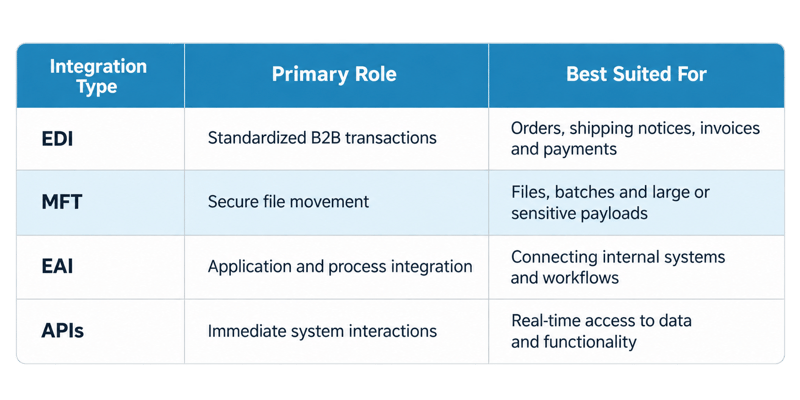
MFT provides the secure movement layer for files, batches, and large or sensitive payloads exchanged across the integration environment.
These technologies may combine to share one workflow. A retailer might use an API to fetch updated product data. Then, MFT securely sends the catalog file. Next, EAI helps load the data into the retailer's internal systems. Finally, they use EDI to send purchase orders to the supplier.
In a well-architected environment, the business need shapes the right combination of integration types.
Where Does MFT Belong in an Integration Strategy?
MFT belongs wherever file movement must be secure, repeatable, observable, and governed. Examples include:
- Partner exchanges
- Internal application feeds
- Cloud transfers
- Data-lake ingestion
- High-volume batch processes
MFT’s role should be deliberate. Departmental accounts, scripts, servers, and cloud services can obscure sensitive data flows. They can also create redundant infrastructure. Bringing these transfers onto a shared MFT platform can restore visibility and reduce overlap.
For that to happen, teams must first identify the systems and business processes tied to each transfer.
Modernizing MFT starts with critical file flows. Teams must identify them, reduce unmanaged transfers, and apply common standards. They must also connect file movement to the wider environment.
Done well, MFT becomes a dependable, shared service rather than a collection of invisible handoffs.
Where Can I Get Support for My MFT Solution?
Contact Remedi for help with assessing, modernizing, or migrating your MFT capabilities. We also offer qualified consulting and platform support resources.
Links to Series Articles:
https://www.remedi.com/blog/the-modern-integration-mix-why-edi-still-runs-global-supply-chains
About Us
Remedi helps customers succeed with the platforms they prefer, from IBM, Cleo, Microsoft, 1 EDI Source, SEEBURGER, Boomi, OpenText as well as custom and legacy solutions.
FAQs
1. What is managed file transfer?
Managed file transfer is a secure, centrally controlled way to transfer files between systems, users, locations, and external partners. MFT platforms add automation, monitoring, access controls, encryption, and auditability to the transfer process.
2. How is MFT different from FTP?
FTP is a protocol for moving files. MFT is a broader platform and operating approach that may use secure protocols such as SFTP, FTPS, HTTPS, or AS2 while adding centralized administration, workflow automation, monitoring, alerts, and audit records.
3. Is MFT the same as EDI?
No. EDI defines standardized business documents and the rules used to exchange and process them. MFT securely transports files and payloads. An organization may use MFT to carry EDI documents. However, it usually needs added EDI capabilities to translate, validate, and manage the business transaction.
4. When should an organization use MFT instead of an API?
MFT is often well suited to large files, scheduled or batch exchanges, durable payload delivery, and partners or systems that do not support APIs. APIs are generally better suited to immediate system interactions and real-time access to data or functionality. Many environments use both.
5. Why do MFT environments become complex?
MFT environments can accumulate large numbers of partners, endpoints, credentials, certificates, protocols, schedules, scripts, and dependencies. Complexity increases when teams lack complete transfer inventory and ownership of monitoring and common operational and security standards.