

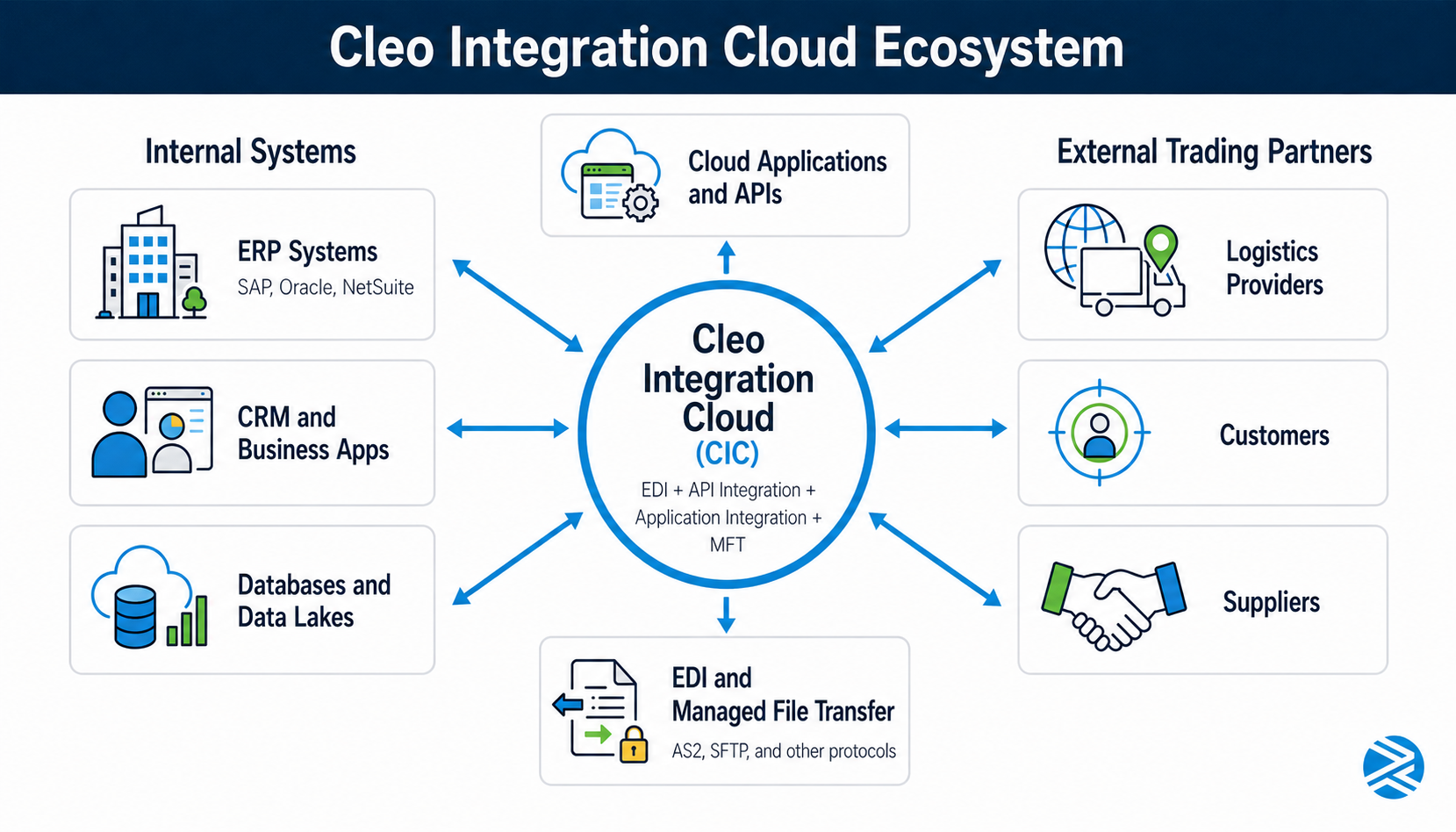
Cleo Integration Cloud (CIC) is a cloud-based integration platform that combines EDI, API integration, application integration, and managed file transfer in one environment. For companies evaluating Cleo, planning a migration, or trying to strengthen support after go-live, the biggest questions usually fall into five areas: platform fit, technical setup, migration risk, operational support, and compliance.
This FAQ answers common pre-sales, implementation, migration, support, and security questions for teams comparing Cleo with traditional EDI tools or other integration platforms. It also explains where an experienced integration partner can help reduce risk, especially when trading-partner complexity, ERP connectivity, integration modernization, or production uptime are involved.
Jump to:
- Pre-Implementation and Evaluation
- Technical Setup
- Migration
- Operations and Support
- Compliance and Security
Pre-Implementation and Evaluation
What is Cleo Integration Cloud, and how does it differ from traditional EDI?
Cleo Integration Cloud is an iPaaS B2B integration platform used for EDI, API integration, and application connectivity across complex partner and internal ecosystems. Traditional EDI platforms focus mainly on exchanging standardized business documents such as purchase orders, invoices, and shipment notices. CIC adds orchestration, broader application connectivity, and cloud-based management tools, which Remedi outlines in its platform breakdown.
Companies that need more than document exchange get a wider integration model from CIC. It connects trading partners, internal systems, and cloud applications in one environment, which suits organizations that want visibility and automation across an entire business process rather than a single EDI workflow. Remedi covers this in more depth in Cleo integration solutions for the modern integration ecosystem.
How does Cleo compare to Boomi, MuleSoft, or SEEBURGER?
Cleo can be a stronger choice when a company needs deep B2B, EDI, and trading-partner integration rather than primarily internal application integration. Remedi’s comparison of iPaaS vendors positions Cleo as a logical fit for businesses with high transaction volumes and complex external partner ecosystems, while Boomi and MuleSoft tend to suit broader application integration and API-led projects but also support EDI and business integration.
SEEBURGER competes more directly with Cleo in B2B and EDI-heavy environments, especially when global trading-partner connectivity and integration governance are priorities. The right fit depends on existing architecture, ERP landscape, transaction complexity, internal skill level, and whether the project is driven more by supply-chain EDI needs or by API and application modernization goals.
Is Cleo a good fit for mid-market companies, or is it enterprise-only?
Cleo works well for both mid-market and enterprise organizations because it supports cloud, on-premises, and hybrid deployment models. Remedi positions it as a strong option for industries such as transportation/logistics, manufacturing, distribution/retail, and food and beverage, especially when companies need to manage partner connectivity and automation without stitching together multiple tools.
Mid-market companies often benefit most when they have growing partner networks, limited in-house EDI resources, or a need to combine EDI and API integration in one platform rather than buying or managing separate systems. That combination makes Cleo a practical fit for companies that are outgrowing basic EDI tools but do not want unnecessary platform sprawl.
What trading partners does Cleo support out of the box?
Cleo is built to support large ecosystems of customers, suppliers, distributors, carriers, and other business partners through reusable integration flows and partner connectivity features. Cleo also markets partner onboarding capabilities and a network model intended to speed partner setup and recurring transaction reuse.
The real question is whether CIC already has the document standards, communications protocol, mappings, and onboarding assets a specific partner relationship requires, more than whether that partner’s name appears on a prebuilt list. Companies should evaluate both the platform’s native libraries and the implementation partner’s experience with similar partner communities.
How long does a typical Cleo implementation take?
A typical Cleo implementation can range from a few weeks for a narrowly scoped project to many months for a full cloud migration, ERP integration, and multi-partner rollout. The biggest variables are the number of trading partners, document types, ERP or application endpoints, custom mappings, testing cycles, and internal decision-making speed.
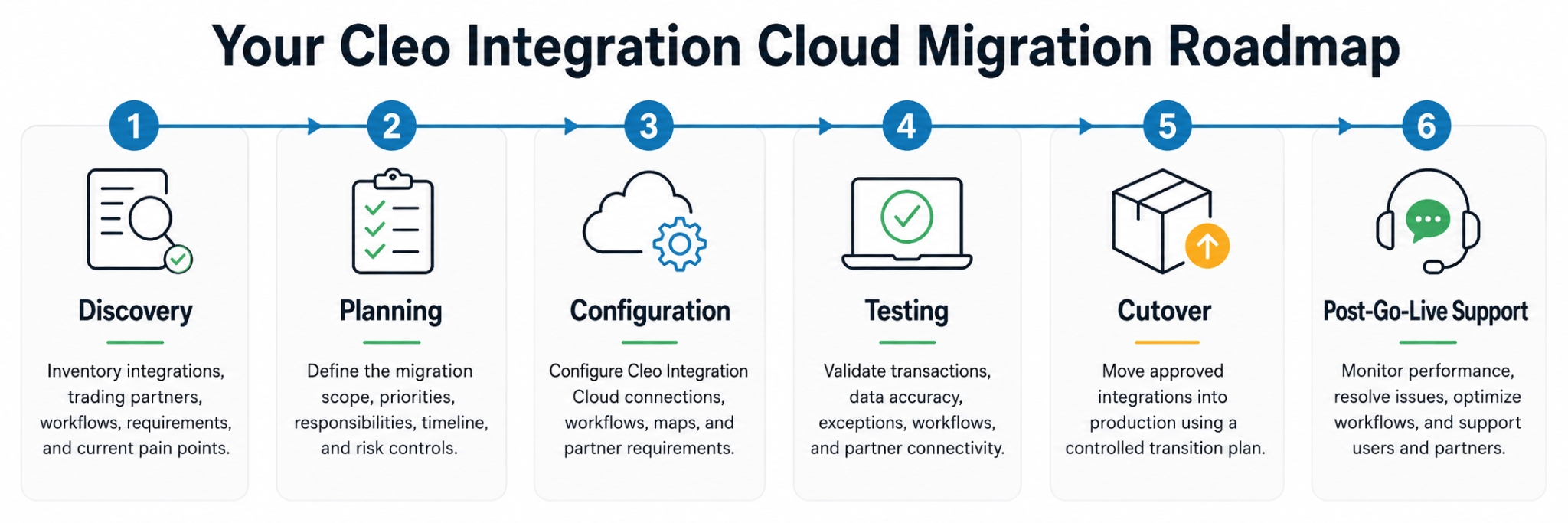
A realistic timeline includes discovery, design, partner onboarding, testing, cutover, and post-go-live support, not just software setup. Remedi’s guide on questions to ask when creating an EDI implementation project plan covers the planning questions teams should resolve before implementation begins.
What does Cleo cost, and how is it licensed?
Cleo does not publicly publish standard pricing, so buyers should expect a custom quote rather than a fixed list price. Licensing typically depends on deployment model, transaction volumes, number of connections, feature set, environment complexity, and whether managed services are included.
The most accurate way to estimate cost is to define the scope first: partner count, document volume, integration endpoints, required protocols, compliance needs, and support expectations. Vague scope is one of the most common reasons estimates come back inflated, incomplete, or hard to compare across vendors.
Technical Setup
What EDI standards does Cleo support, including X12, EDIFACT, and AS2?
Cleo supports common B2B integration requirements including EDI and multiple communications protocols. Cleo positions AS2 as a core secure transport option for EDI exchanges.
Companies evaluating standards support should confirm three layers separately: document standards such as X12 or EDIFACT, transport protocols such as AS2 or SFTP, and any mapping or validation rule capabilities required by specific trading partners. A platform can support a standard broadly while still requiring partner-specific setup for production use.
How does Cleo connect to our ERP, such as SAP, Oracle, or NetSuite?
Cleo connects to ERP systems through application connectors, integration flows, mappings, and endpoint configuration that move data between external partners and internal business systems. Cleo’s NetSuite connector documentation describes using the Application Cloud Connector Wizard to connect to NetSuite and support operations such as create, delete, search, update, and insert.
Companies define source and destination endpoints, build the transformation logic, and connect the resulting business processes to the ERP side of the workflow so inbound and outbound transactions run reliably. The exact effort depends on the ERP, the data objects involved, and whether the project requires real-time APIs, batch integration, or both, as detailed in how integrations work in CIC Cloud Edition.
Does Cleo support API-based integrations in addition to EDI?
Yes. CIC handles B2B/EDI integration, API integration, and application connectivity, which makes it suitable for companies that need both document-based partner transactions and modern API-driven workflows in the same environment. Remedi explains that the broader integration model in Cleo integration solutions for the modern integration ecosystem.
Many businesses now run hybrid integration models, where a single business process might involve an API call to an application, an internal transformation step, and an outbound EDI transaction to a trading partner. Using one platform for both patterns simplifies architecture and support.
How do we onboard new trading partners in Cleo?
Cleo onboarding starts by adding the trading partner, importing the relevant transaction set from a library, defining envelope IDs, and associating that transaction with the appropriate ERP-side and connection processes. Cleo’s onboarding demo shows teams testing the transaction, adjusting partner-specific requirements, and publishing the integration before going live.
Onboarding speed depends on how similar the new partner is to existing partners, whether reusable mappings already exist, and how much partner-specific testing is required. Companies with many partners often benefit from a standardized onboarding process managed jointly by internal teams and an experienced integration partner.
What communication protocols does Cleo support, including AS2, SFTP, and FTP?
Cleo supports a broad range of communications protocols for B2B, EDI, file transfer, and hybrid integration use cases. Cleo’s own support and product content reference secure protocol options such as AS2 and SFTP for production integrations.
For most buyers, the harder question is whether a supported protocol can be governed, monitored, and secured in a way that fits the business and the partner community. AS2 is often preferred for secure, auditable EDI exchange over the internet, while SFTP remains common for file-based partner connectivity and staged data movement.
Migration
How do we migrate from our legacy EDI system to Cleo?
A successful migration to Cleo begins with discovery and inventory. Teams document existing partners, document types, maps, protocols, schedules, exception paths, and ERP touchpoints before rebuilding or rationalizing those flows in CIC.
Remedi’s logistics migration case study shows this can happen without disrupting production when the project is staged carefully and aligned to business priorities. The most effective migration plans include parallel testing, cutover criteria, rollback planning, and clear ownership for partner communications and issue resolution.
Can we run Cleo in parallel with our existing EDI setup during transition?
Yes. Many organizations run Cleo in parallel with a legacy environment during migration to reduce risk and validate outputs before final cutover, comparing acknowledgments, transaction results, partner behavior, or ERP posting outcomes across old and new environments along the way. Whether a parallel phase is practical depends on transaction volume, partner readiness, integration architecture, and the ability to avoid duplicate processing.
A structured parallel plan defines which transactions are mirrored, how exceptions are reviewed, and exactly when production ownership moves from the old platform to CIC. The goal is to reduce cutover risk without creating duplicate processing or unclear system ownership.
How do we handle in-flight transactions during migration?
In-flight transactions need a cutover plan that identifies what has already been received, what is still processing, what must be resent, and which system is the system of record at each stage of the transition. The goal is to prevent duplicate messages, missed acknowledgments, and posting gaps in downstream systems.
This is one of the highest-risk parts of any EDI migration, so it deserves explicit runbooks rather than general testing. Best practice includes freezing nonessential changes, reconciling queues before cutover, tracking acknowledgments, and monitoring closely during the transition window.
Operations and Support
Who manages the Cleo environment after go-live, internal team or a partner?
Either model can work. Some companies keep day-to-day ownership in-house, while others rely on a partner for monitoring, partner onboarding, issue resolution, and optimization. The right choice depends on internal staffing depth, business criticality, change volume, and how much Cleo-specific expertise the organization already has.
A blended model is common in practice. Internal teams retain business ownership while a specialist partner handles platform administration, mapping support, and complex troubleshooting. This kind of structure keeps business accountability internal while giving the team access to specialized Cleo expertise when issues, changes, or onboarding demands exceed internal capacity.
What does error handling and exception management look like in Cleo?
In Cleo, exception management includes validation, process-level routing, alerting, and investigation of failed or malformed transactions before they create downstream business problems. Strong exception management combines platform capability, operational process, and support discipline, and the platform’s real value shows up in how failures get surfaced, routed, retried, or escalated, not just in how documents get transported.How do we monitor transaction volumes and SLA compliance?
Monitoring includes transaction counts, processing status, delivery success, acknowledgments, queue backlogs, failed transactions, and time-to-resolution against defined service expectations. Cleo positions auditability and SLA assurance as part of its value for managed B2B integration risk.
Dashboards alone won’t get a business to reliable SLA management. Teams also need alert thresholds, escalation paths, documented support ownership, and a review cadence that ties technical events to business impact, whether that’s delayed shipments, invoicing issues, or missed customer commitments.
What happens when a trading partner sends a malformed document?
The platform should reject, quarantine, or flag the transaction based on validation rules and route the exception for review. The right response depends on the error type, such as envelope errors, structural format problems, invalid codes, missing required elements, or a mapping mismatch, and the key is isolating the problem without interrupting unrelated flows.
Well-designed exception handling makes it easier to notify the trading partner, document the issue, correct the mapping or source data if needed, and prevent repeat failures.
Compliance and Security
Is Cleo SOC 2 compliant?
Cleo states that its B2B integration security and compliance offering includes certified security with SOC 2 and ISO 27001, along with auditability and SLA assurance, detailed in Cleo’s compliance proof pack. That supports a yes for Cleo’s broader security posture, but buyers should still verify the exact scope, report type, covered services, and current audit period during procurement.
“SOC 2 compliant” gets used loosely in marketing, which is why security teams want the formal report details, the relevant controls, and confirmation that the specific Cleo service being purchased falls within the audited boundary.
How does Cleo handle data retention and audit trails?
Cleo emphasizes auditability in its compliance messaging, pointing to a platform designed for traceability, monitoring, and review of integration activity. In most B2B integration environments, data retention and audit trail design involve both platform settings and customer policy decisions about how long to retain transaction data, logs, acknowledgments, and related operational records.
Retention requirements vary by industry and risk posture, so companies should confirm exactly what is stored, where it is stored, how it can be exported, and how retention controls align with internal governance or regulatory requirements. This matters cross-industry but especially in finance, healthcare, and other regulated trading environments.
Need help evaluating, migrating, or supporting Cleo?
Remedi helps companies assess Cleo Integration Cloud, plan EDI migrations, onboard trading partners, connect ERP systems, execute API integrations and marketplace connections, and support production integration environments after go-live. If your team is comparing platforms, preparing for a migration, trying to reduce integration risk, or needs consulting/managed services support, Remedi can help you define the right path.
Contact Remedi to discuss your Cleo integration needs.